On-device · Works with no signal

Job photos into
client-ready reports.

Shoot on site and every photo files itself to the job — tagged before, during or after, and stamped with the date, the address and the compass bearing. One tap turns them into a branded PDF your client can actually read.

Download on theApp StoreFree to use — 3 reports a month
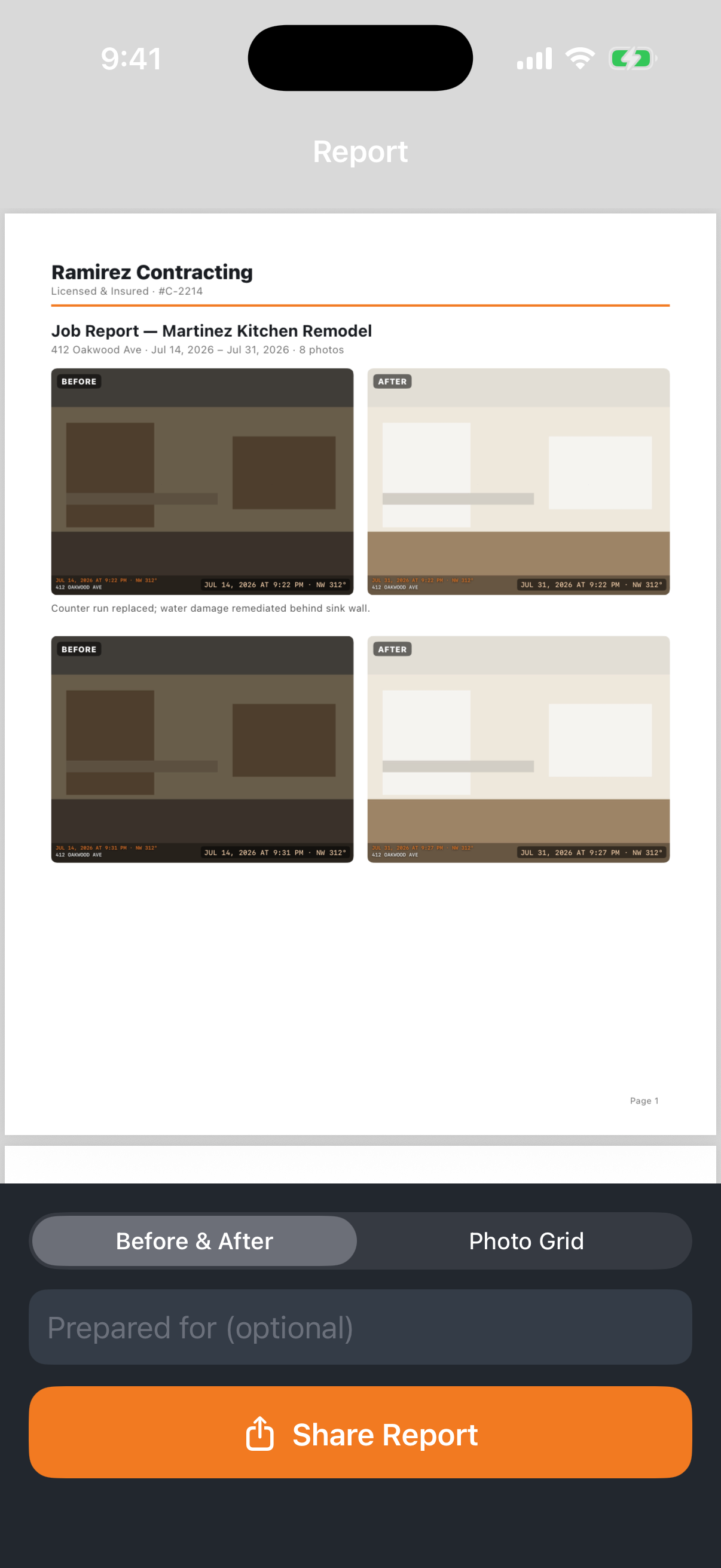
A finished Hardhat before-and-after PDF report
Before & after, side by side Date, address & bearing stamped Photos never leave your phone Works with no signal

Built for the person doing the work

One job, done well — on a phone, in gloves, with no signal.

Organised by job

Every photo lands in the right job automatically. No more hunting through a camera roll for the one shot you need.

Before & after pairs

Pair a before with an after and the report lays them side by side — the comparison your client actually wants to see.

Stamped as you shoot

Date, time, site address and compass bearing burned into the photo, so your record stands up later.

Your letterhead

Company name, licence number and logo across the top of every report. It goes out looking like your business.

No signal needed

Basements, roofs, crawlspaces. Everything runs on the phone — nothing waits on a connection.

Private by design

No account, no server, no analytics. A copy of each photo also goes to your own Photos library, so your backup keeps it.

Three steps on site

Start a job, shoot, send.

Start the job

Client name and address. Ten seconds, once.

Shoot as you work

Before, during, after — tagged and stamped automatically.

Send the report

One tap to a branded PDF, straight from the driveway.

Free to start
$8.99 /month

or $59.99/year — about $5 a month, with a 7-day free trial

  • Free: 3 reports every month
  • Pro: unlimited reports
  • Your logo on every report, no watermark
  • GPS & compass stamps
Download on theApp Store

Hardhat Pro is an auto-renewing subscription. Payment is charged to your Apple Account at confirmation of purchase and renews automatically unless cancelled at least 24 hours before the end of the current period. Manage or cancel in your Apple Account settings.

Questions, answered

What does the report actually look like?

US Letter PDF with your company name, licence number and logo at the top, then your before-and-after pairs side by side, each with its date and location stamp and your caption underneath.

Does it work without a connection?

Yes. Shooting, organising and building the PDF all happen on the phone. You only need a connection when you actually send the finished report.

Where are my photos stored?

On your device. Hardhat has no account and no server, so we never receive them. If you allow it, a copy of each photo is also saved to a Hardhat album in your own Photos library, so your normal device backup keeps a copy.

What do I get for free?

Three reports every calendar month, with a small footer credit. Pro removes the cap and the credit, adds your logo, and adds GPS and compass stamps.

Can I cancel?

Any time, from your Apple Account settings. Cancelling stops the renewal — the jobs and photos already on your phone stay yours.
Document your next job properly

Before-and-after PDF reports from your own photos — on-device, offline, and branded as your business.

Download on theApp Store